

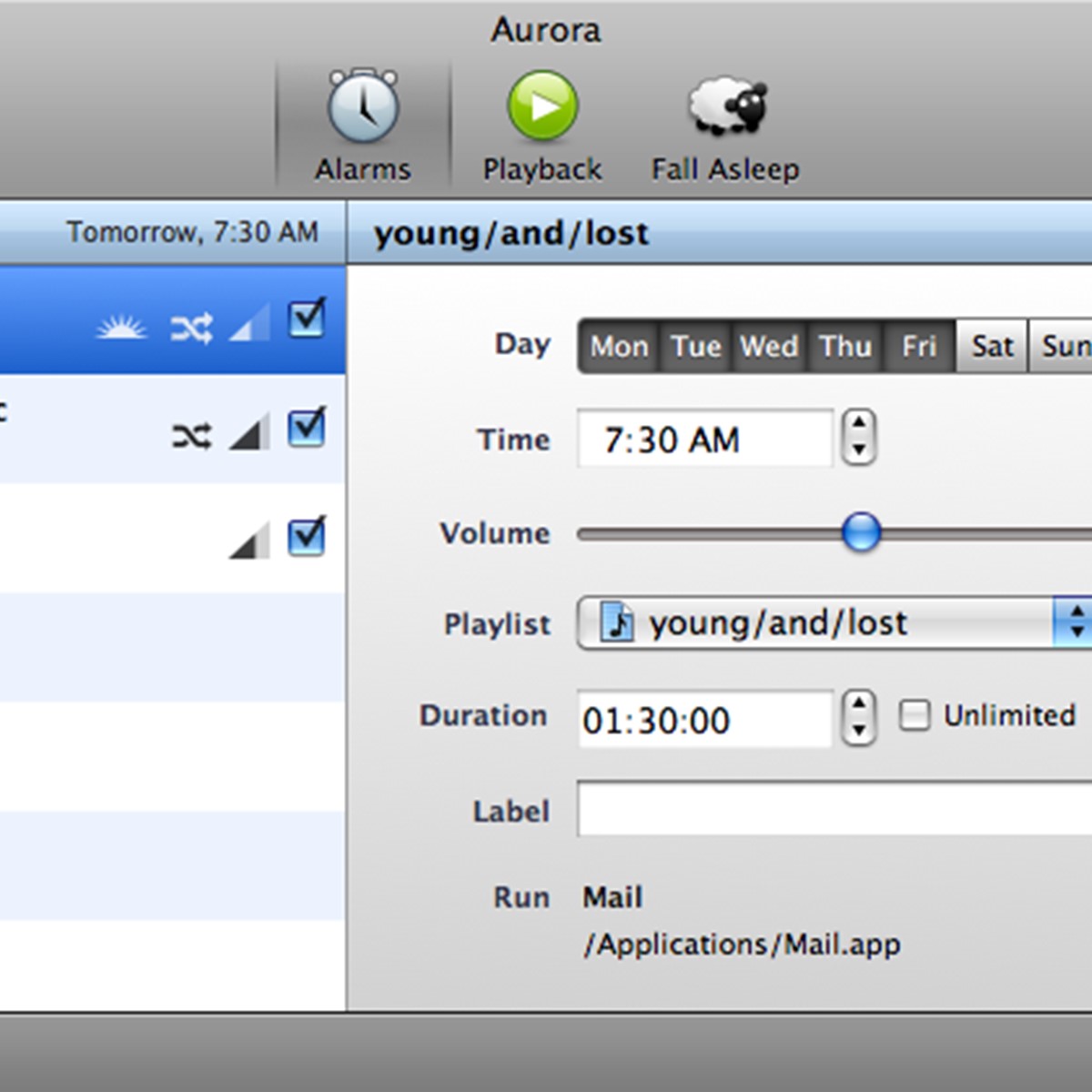
Lassen Sie sich von Aurora und Ihrem Mac wecken. Wachen Sie jeden Morgen zum Klang Ihrer Lieblings-iTunes-Wiedergabeliste auf, anstatt dieses lästigen Weckers.
Aurora ist ein Wecker für Ihren Mac, mit dem Sie mit Ihrer bevorzugten iTunes-Wiedergabeliste oder einem beliebigen Fernseh- oder Radiosender von EyeTV aufwachen können. Weitere Funktionen sind ein Schlummertimer, ein Einschlaftimer, Apple Remote Support und die Möglichkeit, Ihren Mac aus dem Ruhezustand oder aus einem ausgeschalteten Zustand zu wecken.
Aurora 4 hat die Benutzerfreundlichkeit und Zuverlässigkeit deutlich verbessert. Die Alarmeigenschaften sind viel besser zugänglich. Alarme, Wiedergabe-/Schlafmodus und Einschlafmodus haben ihre eigenen Bedienfelder. Aurora baut immer noch auf iTunes-Wiedergabelisten auf, verwendet aber iTunes selbst nicht zur Wiedergabe, was die Zuverlässigkeit deutlich erhöht. Aurora 4 nutzt die Vorteile der Mac OS X Leopard-Technologien voll aus und läuft nicht unter Mac OS X Tiger oder früher.
Aurora spricht Ihre Sprache: Es gibt sie in den Sprachen Englisch, Deutsch, Französisch, Japanisch, Italienisch, Spanisch, Niederländisch und Russisch.
Lassen Sie sich von Aurora und Ihrem Mac wecken
Aurora ist ein Programm, um Sie und Ihren Mac zu wecken. Wachen Sie jeden Morgen zum Klang Ihrer Lieblings-iTunes-Wiedergabeliste auf, anstatt dieses lästigen Weckers. Wenn die Nacht kommt, brauchen Sie keine Schafe mehr zu zählen. Aurora hilft dir, beim Klang deiner Lieblingsmusik oder eines Films einzuschlafen.
Probieren Sie es aus, es ist kostenlos und einfach
Der beste Weg, um herauszufinden, ob Aurora Ihren Bedürfnissen entspricht, ist, die neueste Version herunterzuladen und den Demo-Modus auszuprobieren. Außerdem solltest du die folgenden Punkte lesen, um mehr über die erstaunlichen Funktionen zu erfahren.
Was kann Aurora für Sie tun
Weckt dich und deinen Mac
Aurora weckt Sie und Ihren Mac rechtzeitig, so dass Sie Ihren Mac nicht laufen lassen müssen. Du kannst es sogar über Nacht ausschalten.
Einschlaf-Timer
Schlafen Sie bei einigen Melodien, einer DVD oder einem Quicktime-Film ein. Aurora blendet die Lautstärke und Bildschirmhelligkeit aus und schaltet Ihren Mac automatisch in den Ruhezustand. Erfahren Sie mehr
Bringen Sie Ihre eigenen Wiedergabelisten mit
Verwenden Sie Ihre vorhandenen iTunes-Wiedergabelisten, um die Musik auszuwählen, die Sie beim Aufwachen oder Einschlafen hören möchten. Erfahren Sie mehr
Erinnerungen und Kalenderunterstützung
Erstellen Sie einen Aurora-Alarm aus einer Erinnerung oder einem Kalenderereignis.
Siri-Unterstützung
Erstellen Sie eine Erinnerung mit Siri auf Ihrem iDevice und Aurora erstellt automatisch einen Alarm daraus.
Vollbild-Unterstützung
Aurora funktioniert jetzt hervorragend im Vollbildmodus.
Alarme
Richten Sie so viele wöchentliche oder tägliche Alarme ein, wie Sie benötigen, wählen Sie eine Wiedergabeliste für jeden einzelnen und schon kann es losgehen.
Schlummerfunktion
Schnappen Sie sich die Alarmwiedergabe und erhalten Sie noch ein paar weitere wertvolle Ruheminuten, bevor der Alarm wieder losgeht.
Alarmzeit im Dock
Das Docksymbol von Aurora zeigt Ihnen die nächste Alarmzeit an, auch wenn Aurora nicht läuft, so dass Sie auf einen Blick erkennen können, wann Ihr Alarm ausgelöst wird.
Apple Remote Support
Ihr Mac ist nicht in Reichweite Ihres Bettes? Kein Problem! Steuern Sie die Alarmwiedergabe, Lautstärke und Schlummerfunktion mit Ihrer Apple Remote.
EyeTV-Unterstützung
Erwachen Sie dank der EyeTV-Unterstützung von Aurora mit den Nachrichten des Morgens. Aurora kann sowohl EyeTV-TV als auch Radiokanäle abspielen.
International
Aurora ist in 9 Sprachen erhältlich, darunter Englisch, Deutsch, Französisch, Japanisch, Spanisch, Italienisch, Niederländisch, Russisch und Chinesisch.
Aurora ist immer zuverlässig
Haben Sie Ihre Alarme eingerichtet? Großartig. Beachten Sie nun diese drei Regeln, denn Aurora hängt davon ab, dass Ihr Mac richtig aufwacht und Ihre Lautsprecher hörbar sind, sonst kann er keine Musik zuverlässig wiedergeben und Sie nicht wecken.
Schließen Sie den Deckel nicht
Einige Notebooks können nicht aufwachen, wenn ihr Deckel geschlossen ist oder wenn sie nicht an eine Steckdose angeschlossen sind.
Externe Lautsprecher
Wenn Sie die Lautsprecher ausgeschaltet lassen, wird Ihr Mac völlig geräuschlos.
Auto-Login
Wenn Sie Ihren Mac über Nacht herunterfahren möchten, anstatt ihn einzuschalten, aktivieren Sie Auto-Login für Ihr Konto.
Mehr über Aurora erfahren Sie hier: https://www.oneperiodic.com/products/aurora/ (Englisch)


